
watchOS 27.2 Beta 2 Brings Back the App Switcher
watchOS 27.2 beta 2 is bringing back one of the Apple Watch’s most useful multitasking features after Apple removed its familiar shortcut in watchOS 27.
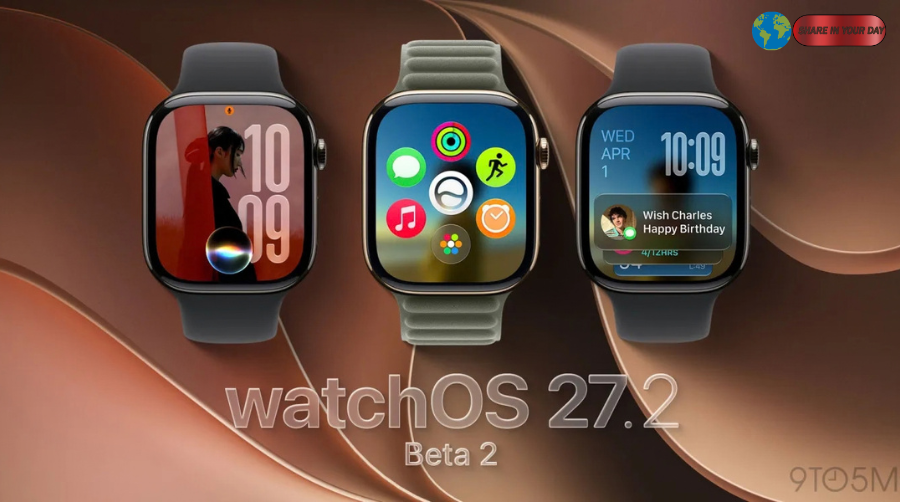
The second developer beta, released September 21, restores the App Switcher, allowing Apple Watch users to view and move between recently used applications. However, Apple has changed the way users access it. Instead of double-clicking the Digital Crown, users can now press and hold the bottom portion of the display while inside an app. 99to5Mac+1
The change addresses one of the more noticeable navigation adjustments introduced with watchOS 27.
Before watchOS 27, double-clicking the Digital Crown opened the App Switcher. From there, users could quickly return to recently used apps, scroll through them with the Digital Crown and remove apps from the list.
That behavior disappeared with the release of watchOS 27.
Now, watchOS 27.2 beta 2 suggests Apple is reconsidering that decision.
watchOS 27.2 beta 2 restores the App Switcher
The biggest change in the latest beta is straightforward: the App Switcher is back.
According to 9to5Mac, users running watchOS 27.2 beta 2 can open the App Switcher by pressing and holding the bottom of the screen while an app is open. The feature then behaves similarly to the App Switcher available in earlier versions of watchOS. 99to5Mac
Once the switcher appears, users can turn the Digital Crown to browse recently used applications.
They can also swipe left on an app and tap the “X” button to remove it from the switcher.
The interface therefore retains much of the functionality Apple Watch owners were accustomed to before watchOS 27.
The major difference is how the feature is launched.
The Digital Crown shortcut is still gone
While Apple has restored the App Switcher, watchOS 27.2 beta 2 does not restore the old Digital Crown shortcut.
For years, double-clicking the Digital Crown served as a fast way to switch between recently used apps. That gesture disappeared in watchOS 27.
The reason is connected to a new feature Apple introduced with its latest software generation.
In watchOS 27, the Digital Crown double-click is being used for Apple’s new Live Rewind functionality on supported hardware. That change meant the previous App Switcher shortcut could no longer occupy the same gesture. MMacRumors
The result was an unusual situation for existing Apple Watch users.
A gesture that had been part of Apple’s interface for years was suddenly unavailable, even though the App Switcher itself had been an established part of the watchOS experience.
The new beta appears to be Apple’s attempt to solve that problem without taking the double-click gesture away from its new purpose.
How to open the App Switcher in watchOS 27.2 beta 2
The new gesture is relatively simple.
While inside an application, users need to press and hold the bottom of the Apple Watch display.
After holding the lower portion of the screen, the App Switcher appears.
From there, users can browse recently used apps using the Digital Crown.
The new interaction is therefore different from the old shortcut but preserves the underlying functionality.
For users who frequently jump between two or more applications, that could make a meaningful difference.
For example, someone could quickly move between Messages and a workout application without navigating back to the Home Screen each time.
Why Apple removed the feature in watchOS 27
The removal was closely tied to the redesigned interaction model in watchOS 27.
Apple’s latest operating system introduced several changes to Apple Watch navigation and interface behavior. One of the most significant involved the Digital Crown.
Previously, a double-click had a dedicated multitasking purpose.
With watchOS 27, Apple reassigned that interaction to Live Rewind on supported Apple Watch models.
The change created a trade-off: Apple gained a new shortcut for a new feature but removed a familiar way of switching between apps.
That decision quickly attracted attention among Apple Watch users and technology publications.
The second beta of watchOS 27.2 now indicates that Apple has found another way to provide access to recently used apps.
The App Switcher still works much like before
Despite the new launch gesture, the App Switcher’s core behavior remains familiar.
Once users open it, they can scroll through recently used applications with the Digital Crown.
They can also remove an application from the list by swiping left and tapping the “X” control. 99to5Mac
That means Apple did not simply add a new multitasking screen.
Instead, it appears to have restored much of the previous App Switcher experience while changing the method used to access it.
This could make the transition less disruptive for users who relied on the feature in older versions of watchOS.
watchOS 27.2 beta 2 arrived only days after beta 1
The timing of the change is also notable.
Apple released the first watchOS 27.2 developer beta on September 16. Beta 2 followed on September 21, just five days later. AApple Developer+1
That is a relatively short interval between beta releases.
The second beta is not limited to watchOS. Apple also released beta 2 versions of several other operating systems, including iPadOS 27.2, tvOS 27.2 and visionOS 27.2. 99to5Mac
Apple’s developer documentation confirms that watchOS 27.2 is currently a beta platform intended for testing, with the corresponding SDK bundled with Xcode 27.2. AApple Developer
That distinction is important because the App Switcher change is not yet a guarantee for the final public release.
The new gesture could still change
As with any beta software, Apple can modify or remove features before the final version becomes available.
The current App Switcher implementation is therefore best viewed as a work in progress.
Apple has not announced that the new long-press gesture will definitely ship in the final watchOS 27.2 release.
Still, its appearance in beta 2 is significant because it shows Apple is testing a direct replacement for functionality that disappeared with watchOS 27.
It also suggests that Apple is responding to feedback surrounding the change.
Apple Watch users get a practical multitasking option again
For everyday users, the return of the App Switcher may be more important than it initially appears.
The Apple Watch has a small display, which makes efficient navigation particularly important.
Opening the Home Screen, finding an application and launching it again can take several steps. The App Switcher provides a faster way to return to apps that were recently being used.
This becomes especially useful when moving between applications repeatedly.
Consider a user tracking a workout while also checking messages, timers or music controls. A recent-app interface reduces the amount of navigation required.
The old Digital Crown shortcut made that process particularly quick.
The new gesture is not identical, but it gives users another direct route to their recent apps.
Apple still has a familiar Digital Crown interaction
Apple’s broader watchOS interface continues to make extensive use of the Digital Crown.
Apple’s documentation describes the Digital Crown as a primary navigation control for the Apple Watch, including pressing, double-clicking and turning the crown for different actions. AApple Support
That makes the change particularly interesting.
Instead of eliminating multitasking altogether, Apple has separated the App Switcher from the Digital Crown double-click.
The company can therefore preserve the newer function associated with that shortcut while still giving users access to recently used apps.
In practical terms, watchOS 27.2 beta 2 is creating two separate interaction paths for two different functions.
What this means for watchOS 27 users
For people who upgraded to watchOS 27 and immediately noticed that the App Switcher was missing, the latest beta is encouraging.
The functionality is returning.
However, users should not expect the old double-click behavior to come back at this stage.
The new system requires a long press at the bottom of the display.
That may take some time to become familiar, particularly for people who have spent years using the Digital Crown shortcut.
Still, once learned, the gesture could provide a similarly quick route to recently used applications.
Is watchOS 27.2 beta 2 available to everyone?
No.
The version discussed here is a developer beta, meaning it is primarily intended for testing rather than ordinary users who want maximum stability.
Apple’s developer documentation identifies watchOS 27.2 as beta software, and the corresponding SDK is available for developers testing applications against the upcoming operating system. AApple Developer
Installing beta software can introduce bugs, performance problems or unfinished features.
For users who depend on their Apple Watch for everyday activities, waiting for the stable release may therefore be preferable.
Developers and experienced beta testers, meanwhile, can use the software to test compatibility and explore the latest changes.
When will the final watchOS 27.2 update arrive?
Apple has not announced a specific public release date for the final watchOS 27.2 update.
The current release remains in beta testing.
Apple’s developer documentation and current beta schedule show that the company is actively testing the software, but features can change before the final release. AApple Developer+1
That means Apple Watch owners should treat the restored App Switcher as a preview rather than a guaranteed final feature.
If Apple keeps the functionality intact through subsequent beta releases, users could eventually receive the new gesture as part of the public watchOS 27.2 update.
A small change with a big usability impact
The return of the App Switcher may not be the headline feature Apple expected from watchOS 27.2.
But for Apple Watch users, it addresses a very practical problem.
watchOS 27 changed a familiar Digital Crown shortcut, leaving users without the same quick method for accessing recently used apps. The latest beta restores that functionality through a different gesture.
That makes watchOS 27.2 beta 2 an important update for Apple Watch navigation.
The key takeaway is simple: the App Switcher is back, but the Digital Crown double-click is not.
Instead, Apple is testing a press-and-hold gesture at the bottom of the display. The App Switcher itself continues to provide access to recent applications, with Digital Crown scrolling and swipe-to-remove controls still available. 99to5Mac
Whether Apple keeps this implementation in the final release remains to be seen.
For now, however, users who missed the old multitasking experience have a reason to be optimistic about the next watchOS update.